TUNNELD
Turn any ARM64 SBC into a Zero Trust Gateway. Tunneld bridges WiFi and Ethernet to build a secure private subnet accessible by identity — no open ports or exposed IPs required.
// THE NETWORK TRADEOFF
Public Exposure
Hosting via a public IP or cloud VM is convenient, but it permanently increases your attack surface. Open ports are discovered within minutes, turning every service into something you must continuously defend.
Traditional VPNs
VPNs secure traffic but introduce operational friction. Sharing access means distributing clients, keys, and broad network reach - even when all you want is access to a single service.
Turn your Network into a Zero Trust Zone
Stop choosing between security and convenience. Tunneld acts as a smart gateway, wrapping your local devices in an outbound-only overlay. Services are addressed by identity, not IP - making your entire subnet accessible from anywhere without public exposure or agent installation.
Your Sovereign Control Plane
Getting Started
Bring Your Own Silicon.
Tunneld transforms commodity hardware into a network appliance. It requires an ARM64 SBC (Pi 4/5, OrangePi) where you physically control the boundaries. This isn’t a client installed on a laptop; it is the network edge itself.
Self-Healing Core.
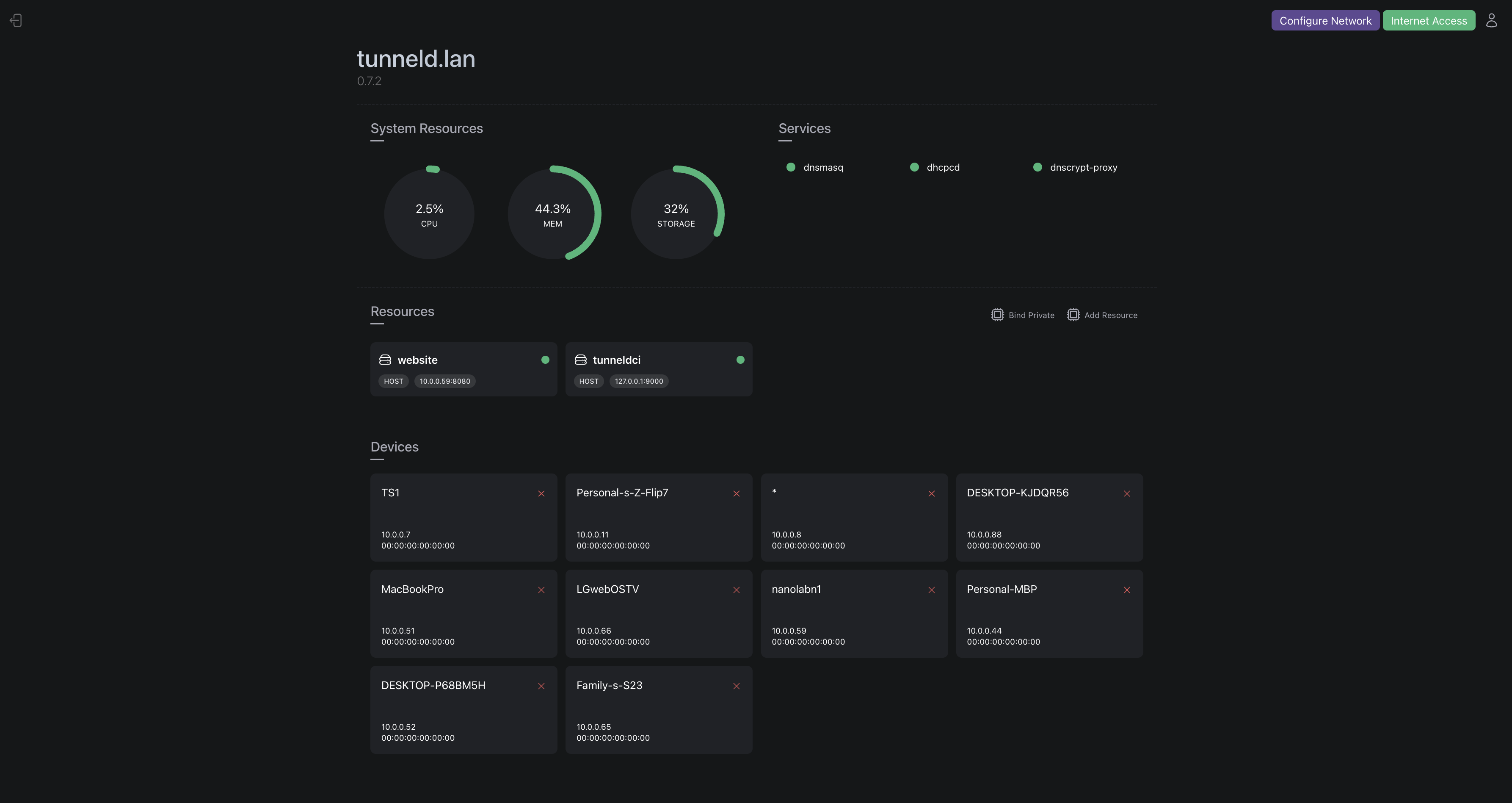
The dashboard orchestrates system services and includes a built-in Load Balancer to distribute instances of services over the same tunnel. Powered by the BEAM (Erlang VM), if a subsystem falters, it recovers instantly without dropping the entire subnet.
The Hardened Edge.
Tunneld takes direct control of Linux networking primitives. It sets up and manages the firewall (iptables), routing tables, and local DNS (dnsmasq) to secure the edge. Traffic is scrubbed and routed locally before it ever touches the overlay.
Identity Over IP.
We replace network trust with cryptographic identity. Self-host your own control plane or connect your OpenZiti/Zrok account to treat this device as a secure environment node. Services are hidden from the public internet, accessible only to authenticated identities.
// SYSTEM CAPABILITIES
Portable Secure Zone
Connect a Tunneld device to any upstream WiFi. It provisions a private subnet. Devices connect through Tunneld and route to your trust domain through authenticated overlay connections, without modifying the upstream network.
Sovereign Traffic Control
Tunneld operates as the local DNS resolver and firewall for your subnet. Enforce curated blocklists, DNS over HTTPS forwarding, and outbound filtering at the edge, stopping unwanted traffic before it leaves your network.
Control Plane Flexible
Tunneld runs local policy enforcement and traffic handling on the Erlang VM. It connects to an external Zero Trust control plane, either hosted or self managed, while enforcing identity based access, service routing, and network isolation directly on the device.
Service Level Publishing
Publish individual services instead of entire subnets. Services can be private by default, reachable only by authorized clients. When you intentionally expose a service publicly, it is mediated by Tunneld rather than opening direct inbound access.
Network Level Resilience
The subnet remains operational during internet or overlay outages. Local DHCP, DNS, and firewall services continue running, allowing devices to obtain addresses and resolve local names even when offline.
Distributed Service Pooling
Aggregate multiple service instances behind one endpoint. Tunneld can proxy and load balance requests across upstreams on your subnet, or across upstreams hosted by trusted peers via private overlay links. This lets you scale a single published service across multiple machines.
// FAQ
It means the device is the network boundary. Wherever you power it on, it recreates the same private subnet behavior: routing, DNS, policy, and service access, independent of the surrounding network.
WireGuard connects machines (IP to IP). Tunneld connects services (Identity to Identity). We use OpenZiti under the hood to eliminate the need for static IPs or open ports entirely.
Not exactly. VPNs connect devices to networks. Tunneld connects identities to services. You don’t join a network; you’re granted access to specific capabilities.
For a self-hosted control plane, yes. Alternatively, you can connect the device as an environment to zrok (see getting started). However, your edge devices (Raspberry Pis) can be behind strict NATs or 4G connections and still be reachable.
Local networking continues to function. Devices can still communicate through the Tunneld gateway, resolve DNS locally, and enforce policy even without overlay access.
We target ARM64 SBCs (Raspberry Pi 4/5, OrangePi, NanoPi) running Debian based operating systems. x86_64 support is available but optimized for low-power edge silicon.
Yes. Multiple devices can participate in the same overlay, exposing or consuming services while remaining physically separate.
Yes. The entire stack is open source. You can audit the Elixir code, the underlying Ziti overlay logic, or view the self-hosting docs.